iPhone Apps for Kids

Sep 15th, 2008 | By Ryan Ozawa | Category: Reviews

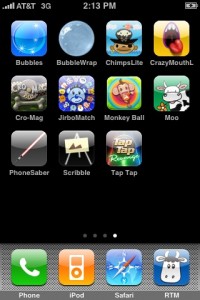
iPhone AppsI have three kids. My wife, mother and I all have iPhones. This is not a coincidence. It didn’t take long after the introduction of the iPhone to realize that the iPhone was a great tool for entertaining youngsters and buying parents some peace… provided said youngsters are not fighting over the device itself. If you’ve got children and an iPhone in the same house, kid-friendly applications are a must-have. Here are my favorites — all links are iTunes links.

For younger kids, Bubbles and BubbleWrap are both free and wonderfully simple. Bubbles lets you conjure bubbles with a sweep of your finger, which you can then pop with a tap or just watch drift away.  BubbleWrap lets you pop virtual bubble wrap, racing to see how many bubbles you can pop in 45 seconds. Unlike the real thing, this bubble wrap never runs out of bubbles.

Even simpler is Moo. It moos. Free, and good for a few giggles, so definitely worth the price.

If your kids like to ham it up, they’d probably love CrazyMouth (Lite), which basically puts a big cartoon mouth on the screen that your kids can then hold up to their faces, letting them express the toon within. There’s also a paid version with more animated mouths, and another variation called CrazyEye.  Personally, the free version was more than enough.

For young kids with an artistic streak, there’s Scribble, a simple painting app. A palette of colors and pen sizes lets you draw shapes (on a blank canvas or on a photo) or practice writing.  You can save the artwork to your photo album (where you can e-mail it to appreciative grandparents), or erase it with a quick shake.  There are lots of other drawing apps, but I keep coming back to Scribble for its simplicity and price: free.

If your kids are older — say, four to six years old — they might want more of a challenge.  There’s Match by Jirbo Kids, a basic memory game that the company says is “free for just a few more days.”  Not complex enough? Ease them into arcade games with Chimps Ahoy! Lite, a fun game sampler that’s worth the download merely for its “Breakout”-like experience.  It’s free, but if you fall in love with the chimps, the full version offers 100 levels for just $2.99.

Finally there’s Tap Tap Revenge, the free, finger-sized version of “Dance Dance Revolution.” Grown ups like this one as much as the kids.  A warning, though: the songs get stuck in your head. Especially if your kids, like most kids, play everything over and over and over and over again.

Like many of the best iPhone applications out there, it bears repeating that all of the apps I’ve mentioned are free.  If you’re willing to spend a little money, though, a few honorable mentions: Preschool Adventure costs a buck, but could easily replace a backpack full of activities for little ones. I could see paying much more for this colorful, elegant application. And for older kids, there’s Cro Mag Rally, a fun racing game that used to cost $10 but is temporarily discounted to $2, and top seller Super Monkey Ball, which is a top seller for a reason.  When it comes to making use of the iPhone’s accelerometer (and involving a whole different dimension hand-eye coordination), it’s fun to play… even if your monkey plummets off the edge every single time.

So go ahead and take the time to set up a kids-only page of apps on your iPhone.  You may have second thoughts about letting kids play with an expensive gadget. I say they’re going to get their little paws on it sooner or later. You might as well have something waiting for them… lest they decide to start deleting contacts instead!

Note: These applications also work on the iPod Touch, and hopefully any future Apple hardware designed to work with Apple’s App Store!

Related posts:

  1. Creating and archiving tweets about your kids By Bryan Person Looking for an easy way to capture...
  2. A “Spoof” Is Not Always Funny: Teaching Kids The POWER of Technology Our children are growing up in an amazing, incredible, awe...
  3. Photo Related Dad Project Imagine having the entire first year of your child's life...
  4. Why Are So Many Kids Halloween Costumes So Inappropriate? Kids' costumes in modern times have gone from sickly sweet...

Related posts brought to you by Yet Another Related Posts Plugin.

Tags: , , , , ,
  • "Balls Kids" is new. It's a toy and timewaster, with absolutely no educational value whatsoever. You touch the screen to add balls or blow them up, and tilt to roll them around. They chime and make funny noises when they hit each other or the sides of the screen.

    Fun in the car, too - you can see the effect of accelerating, braking and turning on the balls.

    http://itunes.apple.com/WebObjects/MZStore.woa/...
  • AshleysMumsie
    Where is Little Cook? That is my kids favorite iPhone/iPod Touch game and it's not on the list!! I have bought more than a couple of the games on this list but my little girl keeps going back to Little Cook. I would love to see it get a place on your next roundup because unliek some of the games on this list, she is actually learning applicable knowledge from LC. Anyway, thanks for this list, I will be grabbing a couple of these apps for sure!
  • ABC Zoo - is a great iPhone app to help your kids get used to reading. very helpful while travelling
    http://www.xoxol.net
  • You'll find many sounding pictures for kiddies on http://www.Winzki.de
    I made them for my little boy, and he insists on testing them over and over ;-)
    These very nice apps have been specifically designed for the use by young children. (And you don't need to blow into the phone ;-) ) For example: If you swipe, it even works when another finger rests on the display. My boy taught me that to keep his frustration low.

    iTunes Link for "Lite Winzki": http://itunes.apple.com/WebObjects/MZStore.woa/...
  • We have developed a handful of applications for kids and mainly focusing on education category.

    Math Magic: Kids can learn as well as have fun with math. They can practice addition, subtraction, multiplication and divisions. Random problems will be shown to the kids and they need to choose the correct answer

    Word Magic: Kids need to choose the missing letters for the picture shown. Best suited for kids from UKG till 2nd standard.

    Math Series: Kids need to identify the missing numbers. The numbers could either be in descending or in ascending orders

    Match Magic: This application is best suited for younger kids < 6 years. They need to match the pictures/colors/count the numbers by identifying and matching them

    Count Magic: This application is also suited for kids < 6 years. This app helps to kids to learn counting. They need to catch the number shown. As they keep counting, audio voice will help the kids in counting.

    Think BIG: This app is kids in 5 to 10 age group. A group of numbers are shown. They need to pick up the largest or smallest number.


    All of our games have rewards and stickers and scores built to motivate and encourage the kids.

    Please check them out at http://www.anusen.com and videos @ http://www.youtube.com/kidsiphoneapps


    Here are couple of blogs on our apps
    http://tinyurl.com/c5kbmx

    http://tinyurl.com/dmzyqq
  • Tim
    Take a look at Morgan Moody's Math Adventure.

    -Helps children practice their counting, adding, subtracting, multipling, and dividing.
    -Also allows you to change the difficulty of the problems.

    http://bit.ly/s4GIH
  • Try this one out:
    MonsterABC $.99
    www.monsterabc.com

    MonsterABC is the latest in early childhood development tools – built specifically for the iPhone.

    Join the Monster as he explores the alphabet, sounding out letters and words.

    Letters - Explore the alphabet by clicking letters. Tap the monsters at the top of the screen to move through the alphabet. Don’t forget to tap the picture at the bottom to hear the word sounded out.

    Words- The word at the bottom of the screen is missing a letter. Tap the missing letter at the top of the screen to fill it in.

    http://itunes.apple.com/WebObjects/MZStore.woa/...
  • iiiPhone
    Also, check out Happy Baby - Alphabet learning tool
    - English alphabets are displayed sequentially (like flash cards).
    - Alphabets are pronounced (Optional switch).
    - Pause button to stop at an alphabet
    - Reset button to start over
    - Timer can be adjusted to delay display of alphabets

    http://itunes.apple.com/WebObjects/MZStore.woa/...
  • For a great fun little app for kids', check out Farm Idol.

    It's a musical farm animal app... (yes, there are others like that!) but what makes this one special is that it looks absolutely beautiful and you can play songs by pressing an animal and tilting the iPhone at the same time. Try a bit of Beethoven using a cow; great fun!

    http://www.pawpawapps.com/farmidol.php
  • My own App just launched last week as well - called “Bumpercars”. It’s especially great for kids - non-violent, has great music and is a simple and easy to use time waster. And it’s the ONLY BumperCars App in the App store!

    The link is below!

    Direct App Store Link:

    http://itunes.apple.com/WebObjects/MZStore.woa/...
  • My own App just launched last week as well - called “Bumpercars”. It’s especially great for kids - non-violent, has great music and is a simple and easy to use time waster. And it’s the ONLY BumperCars App in the App store!

    The link is below!

    Direct App Store Link:

    http://itunes.apple.com/WebObjects/MZStore.woa/...
  • My wife was looking for a good matching game for my daughter so I we wrote FlipFrog http://tropicalpixels.com/flipfrog-appstore matching colors, sounds and frogs. Now my 2 year old won't give me back my phone!
  • Jarhead
    There is a safe internet browser designed for kids as well. This company offers it for free - http://www.mobicip.com. Don't know how long it will continue to be free, so get it while you can.
  • After watching our 4 year old daughter playing with iPhone games, we wanted to divert her with fun and cute learning applications. Here are the apps that we had released.

    Math Magic - a simple game to learn math. Simple addition/subtraction with rewards system to encourage them with vibrant colors and real voice . http://mathmagic.anusen.com

    Word Magic - A cute picture will be shown to the kid and kids need to fill in the missing letter. (options to choose 1 or 2 missing letters). http://wordmagic.anusen.com

    Match Magic - a very simple application where kids need to match the shapes/counts/colors/pictures. They can draw lines or just simple pick/select them. http://matchmagic.anusen.com

    Math Series - kids need to identify a missing number in a number series. The series can be customized from sequential to random numbers. (ascending/descending orders). http://mathseries.anusen.com
  • This is a useful list and review, thanks! I've been working on a handful of iPhone apps for kids, the first has been released. It's called Create-A-Cartoon Face, you can see it at http://www.rcloudsoftware.com/iphone/cartoonface

    I hope that people continue to create more iPhone apps for kids, I think it's a great platform for entertaining little ones when out and about.
  • bugybug
    men, i've got two kids and my wife is pressing me to get them itouch. are these things gonna get cheaper?!!
    did you check out http://www.iphoneandkids.com some lady reviews kids apps and some iphone tips
  • If you have a preschooler who you want to start introducing words to, the iPhone game I See Ewe is a great way to do it. It is actually 2 games in 1. The first game challenges your preschooler to correctly identify a specific shape from a set of shapes based on both verbal and written prompts. You can turn off the verbal prompts if you think your kid is ready to start learning their sight words. The second game is the classic "memory match" game, but it's designed with a preschooler in mind. My 2 year daughter loves it!
  • I got an upgrade to a 3G and we decided to hand off the old one (phone disabled) to my son. He plays monkey ball like a pro and now he can play on his own phone. He says he like it better than nintendo and we can load it up with music and videos we want him to watch. Finally relief from listening to the same movie over and over and over and over.....
  • grace robinette
    I also get nervous when my son starts to shake the iphone around. I try to make sure he is sitting down when he plays. Henry and Hailey's preschool pals, 99 cents, is a game that does not require the iphone to be moved around. My son really likes the characters and sounds.
  • jerrymcn
    i draw the line at apps that require them to move the iPhone around too much. sometimes even a case protector isn't going to help, especially when they're playing with light saber!

    you might want to try waki snap...it's a 2 player game (and not many of those around) so it keeps both of my kids out of mischief at the same time! amazing how they can keep playing it for ages without getting bored...it's a great little babysitter:)
  • joe
    yes my daughter is an addict on the iphone.. she uses it more than me when im at home.. i have a hard time getting time with it.. im actually thinking about buying her an itouch for herself =/
  • Melissa
    This is exactly the sort of advice I've been seeking. I always have my iPhone with me, now I can let the kids play when they are in need of diversions. Thanks!
  • Thanks for giving me yet another reason to break my Sprint account and buy an iPhone. Brick breaker on my antique Blackberry just doesn't cut it for my kids.
blog comments powered by Disqus